

Google Cloud Platform (GCP) offers a powerful suite of cloud services for businesses and developers. In this guide, we will walk you through the step-by-step process of creating a Google Cloud account and granting access to a new user.
Step 1: Create a Google Cloud Account
1.1. Navigate to the Google Cloud Platform website:
Start by visiting the Google Cloud Platform website at https://console.cloud.google.com/.
1.2. Sign in or create a new account:
If you already have a Google account, sign in. Otherwise, click on the “Get started for free” button to create a new account. Follow the prompts to fill in your details and set up a Google Cloud account.
1.3. Provide billing information:
To use Google Cloud services, you’ll need to set up billing information. Google offers a free trial with a $300 credit, ensuring you won’t be charged until you exceed this amount or the trial period expires.
Step 2: Access the Google Cloud Console
2.1. Once signed in, you’ll land on the Google Cloud Console dashboard. This is the central hub for managing your cloud resources.
Step 3: Create a New Project
3.1. In the Cloud Console, click on the project dropdown menu at the top, and then click on “New Project.”
3.2. Provide a project name, select a billing account, and click “Create.” Your new project is now set up.

Step 4: Add a New User to the Project
4.1. In the Cloud Console, navigate to the “IAM & Admin” page.
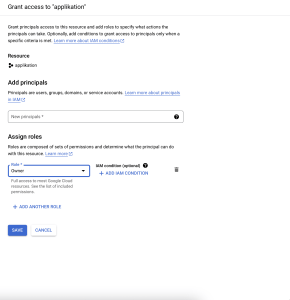
4.2. Click on “GRANT ACCESS” to add a new member to the project.
4.3. Enter the email address of the new user you want to grant access to.
4.4. Select the appropriate role for the user. Roles determine the permissions the user will have within the project. Common roles include Owner, Editor, and Viewer.
4.5. Click “Save” to add the new user to the project.
Step 5: Verify Access for the New User
5.1. Ask the new user to log in to their Google Cloud Console using the provided email address.
5.2. Once logged in, the user can access the project and resources according to the assigned role.
Conclusion:
Congratulations! You have successfully created a Google Cloud account, set up a new project, and granted access to a new user. Google Cloud Platform provides a scalable and reliable infrastructure for various applications, making it a valuable resource for businesses and developers alike. Explore the platform further to leverage its extensive suite of cloud services.