

Hello again! Welcome to part 2 of our 3 part mini series on our new CRM (Customer Relationship Management) platform.
Previously, we’ve reviewed the business requirements for the new system and we’ve highlighted key features that are required for our platform to function day-to-day. It’s time to breakdown what is required in order to achieve them. To recap:
Features
- User Authentication – we required login, but not sign up functionality as the users would be added manually. The web app pages needed to be authentication secured as the data they contained were business sensitive.
- Insights & Daily Vitals Dashboard – a “finger on the pulse” dashboard powered by the data entered in other areas of the platform.
- Marketing Company & Campaign Setup – Add, remove and edit marketing companies and campaigns used by Applikation.
- Clients, Projects & Jobs Setup – Add, remove and edit clients, projects and jobs handled by Applikation. We decided early on that this was the best way for us to get the granular detail we needed for the Insights & Vitals Dashboard to function as per our requirements.
Timeline: Live within 1 month
So, how did we achieve this?
We needed a tech stack that could be built quickly and have features like User Authentication baked in with little effort for us to integrate. That way, we could focus our development efforts on the UI and data presentation.
Backend – Supabase (1 week delivery)
We decided to use Supabase for the data storing, API and User Authentication handling. It provides lots of our required features out of the box, meaning we could create users with their auth integration, use their API for data transfer and their database for secure storing.
Supabase is built on top of Postgres which we’ve been building databases with for years now. We have the technical know how and experience to produce database tables and fields quickly with SQL. Supabase’s dashboard is really intuitive, easy to use and helped us speed up the data aspect of the build. Their instant API meant we didn’t need to build our own backend for the project and could focus on the frontend portal.
Supabase helped us achieve our 1 month target by providing us with a quick way to create and authenticate users, an API and database all in one! It was our first time using it and I have to say our team were impressed. We’ll certainly be using it going forward.
The only aspect we found challenging was RLS (Row Level Security) and policies. We used Supabase’s “@supabase/auth-ui-react” library in the frontend of the app to authenticate users. However, we found it caused an issue with the RLS, meaning users couldn’t view, edit or add data. We had to use “@supabase/auth-helpers-react” instead and the signInWithPassword function to fix the issue.
Frontend – NextJS (3 weeks delivery)
Before actioning our frontend, we designed some simple UI components in Figma to illustrate the design direction we wanted our team to follow. Not only is it part of our standard development process, but it was important to consider who would be using the system and how it needed to look, particularly the dashboard. It needed to be a snapshot into our business, that could provide data which could then be reported on.
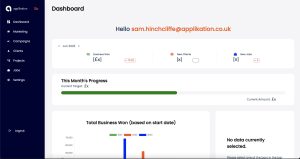
Our tech team is predominantly a Javascript team. It allows us to build backends in NodeJS, frontends in ReactJS and NextJS. So it made sense for us to use a Javascript framework for the frontend build.
The team decided on NextJS as Supabase integrates seamlessly with it and we could take advantage of great libraries like “chart.js”, “@mui/materials”, “react-chartjs-2” and “date-fns” to build components and present the data in the right way.
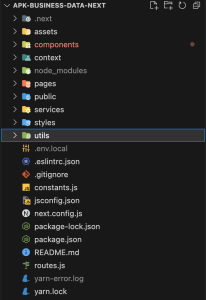
The team did such a good job with the frontend dashboard we were able to add all the features we required on time! (As usual)
Hosting & Deployment – Vercel + GitHub (1 day delivery)
This is a winning combination! Hosting and deploying with Vercel via GitHub. With a single push to the main repository branch in GitHub the deployments are automatically triggered in Vercel, meaning deployments are painless.
We’ve used Vercel for multiple projects and we have found it a joy to work with. It takes a matter of minutes to link your GitHub repository to your new Vercel project and it provides great features like speed insights, deployment management, web analytics and runtime logs.
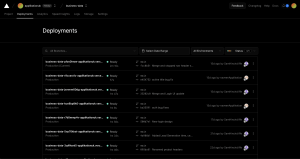
The speed of the deployments was key, we wanted to be able to push our changes quickly for our 1 month deadline, but also be able to add new features without deploying becoming an issue.
So there we have it! We’ve outlined a tech stack that can deliver an internal CRM in 1 month! We’ve guided you through the key steps and decisions we made along the way. In short, we’re proud of what our team has produced. It has surfaced some fascinating insights into our marketing journey we otherwise wouldn’t have seen and it continues to improve our operations day-to-day.
Well done team! 🎉
In part 3 we’ll discuss future improvements we are planning for our internal CRM and how we aim to adapt our platform going forward.